
 中文 | CNY
 English | USD
 Русский | RUB












1. Log in to your Gmail mailbox
Visit https://mail.google.com/ in your browser, enter your account number and password, and log in to your Gmail mailbox.
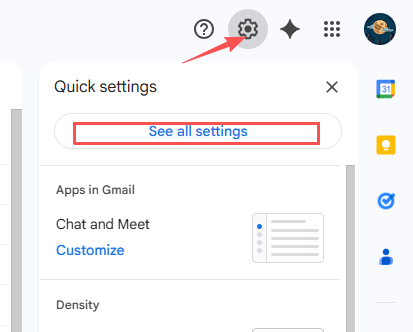
2. Enter the password change entrance
Click Settings in the upper right corner of Gmail, then find and click the "View All Settings" area.
Select "Account and Import" and click "Change Password".
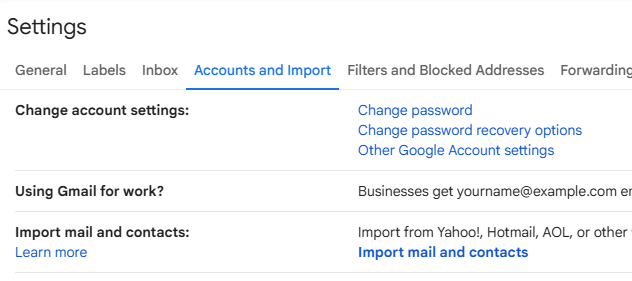
To ensure account security, Google requires authentication. For example, enter the current password or confirm it through your mobile phone Captcha.
3. Set a new password
After the authentication passes, enter the new password to set and enter it again to ensure consistency. Then select "Change Password" to save.
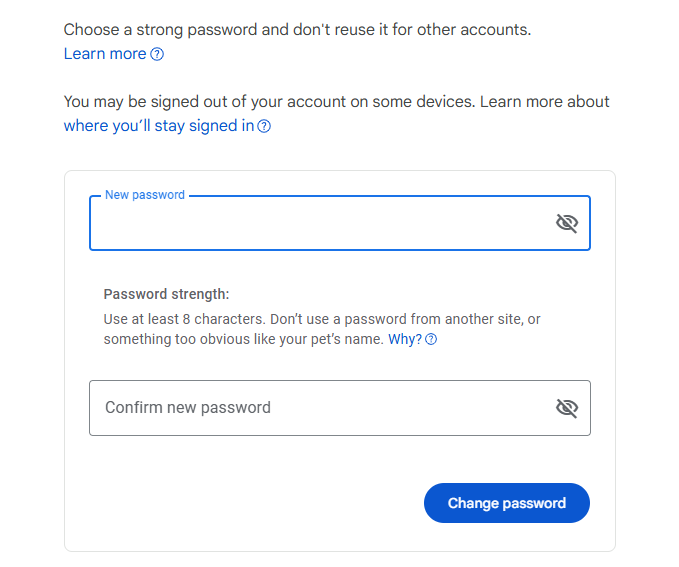
Note: After your password changes, the devices and apps you have logged in may be automatically checked out. Need to login again.
Follow the above steps and you can quickly complete the Gmail password change.