
 中文 | CNY
 English | USD
 Русский | RUB












To keep your account secure, it is important to change your password regularly. If you are already logged into your Facebook account, follow the steps below to quickly update your password and improve your account security.
Step 1: Log in to Your Facebook Account
-
Open your browser and visit the Facebook website.
-
Enter your account information and password to log in.
Step 2: Open “Settings & Privacy”
-
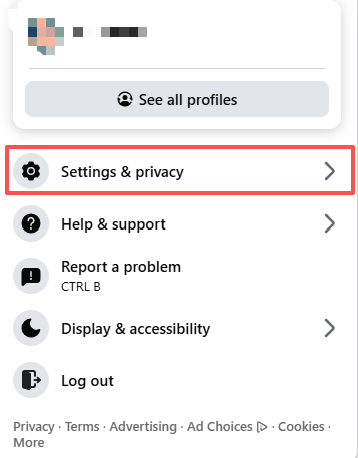
Click your profile picture (or menu icon) in the top-right corner.
-
Select “Settings & Privacy” from the dropdown menu.
-
Click “Settings” to open the account settings page.
Step 3: Go to “Password and Security”
-
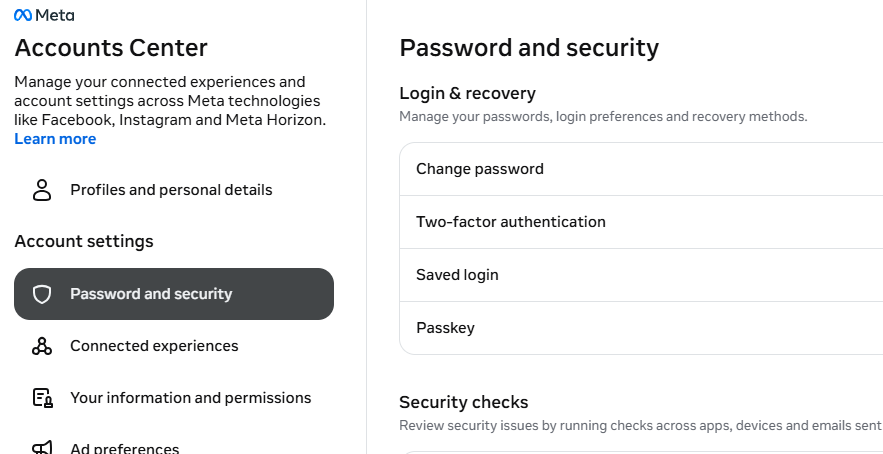
In the left sidebar, click “Password and Security”.
-
Find the “Change Password” section.
Step 4: Change Your Password
In the “Change Password” section, enter the following information:
-
Current Password: Used to verify your identity
-
New Password: Create a strong and secure password
-
Confirm New Password: Re-enter the new password for confirmation
After entering the information, click “Change Password” to save.
Step 5: Log Out of Other Devices
After changing your password, Facebook may ask whether you want to log out of other devices:
-
Yes: Sign out from all other devices to improve security
-
No: Keep other devices logged in
If you suspect unusual activity, it is recommended to choose “Yes”.
Password Security Tips
1. Use a Strong Password
A secure password should include:
-
Uppercase letters
-
Lowercase letters
-
Numbers
-
Special characters (such as @, #, $)
Avoid weak passwords such as:
-
123456
-
abcdef
-
Birthdays or personal information
2. Change Your Password Regularly
It is recommended to update your password regularly, especially if:
-
You receive suspicious login alerts
-
You suspect your account has been compromised
-
You logged in on a public or shared device
3. Enable Two-Factor Authentication
You can enable Two-Factor Authentication in the “Password and Security” section to add an extra layer of protection using SMS codes or an authentication app.
By following these steps, you can easily change your Facebook password and better protect your account security.